
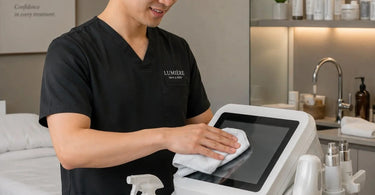
Start fresh, deliver better... and honestly, could there be anything more frustrating than a pristine spa or salon suite that is just begging for a perfect Instagram story, only to have your brand new, high-tech Facial Steamer or Professional Wax Warmers for Salons & Spas look like a toddler just went to town on it with a greasy bag of chips? We get it. Those sleek, modern touchscreens are the jewel of your treatment room, but they are also total fingerprint magnets. Between the massage oils, the wax residue, and the general hustle and bustle of a busy day, they get grimy fast. However, before you reach for that all-purpose spray and a paper towel to give it a good scrub, hold up! That seemingly harmless habit can turn your investment into a very expensive, very streaky paperweight. We are here to chat about the do's and don'ts of screen cleaning so you can keep your gear looking new and your clients impressed.
Your spa or salon is a sanctuary, but it is also a battlefield against grime, germs, and the occasional splash of ItalWax - Pre/Post products. While we all love a good deep clean, especially when we are trying to eliminate bacteria and viruses, your equipment’s touchscreen is a delicate little diva. It is not the same as your countertops or your mirrors. Let’s dive into how to keep those screens spotless, safe, and functioning flawlessly without turning a simple cleaning task into a costly disaster.
The Danger Zone: What NOT to Do
Let’s be real—we are all creatures of habit, and in the heat of the moment, grabbing whatever is closest to wipe down a screen is tempting. But this is where a lot of professionals make a very expensive mistake. Think of it like skincare for your equipment; just like you wouldn't use harsh dish soap on a client's face to remove makeup, you shouldn't use harsh chemicals on a screen.
The Glass Cleaner Trap: You might have a bottle of glass cleaner under the sink for the mirrors, and you figure, “Glass is glass, right?” Wrong! Most household glass cleaners contain harsh chemicals like ammonia or alcohol. While these are great for cutting through the greasy handprints on windows, they are absolutely lethal to the delicate anti-glare or anti-reflective coatings on your equipment's LCD or LED screens . Using these can cause the coating to break down, leading to a cloudy, hazy, or permanently streaky screen that you cannot fix. You will be left looking at a ghost of your former display.
The Wet Wipe Disaster: We are all about sanitation, but sometimes disinfectant wipes are too wet. Spraying liquid directly onto the screen or using a dripping wet cloth is a massive no-no. Liquids can seep past the edges of the screen and into the sensitive internal electronics, causing short circuits, dead pixels, or corrosion that will haunt you weeks later . The goal is damp, not drenched.
Abrasive Tools: Paper towels, tissues, or even some rougher cleaning cloths might seem harmless, but they can actually cause microscopic scratches on the screen surface that accumulate over time. This makes the screen look dull and can even make it more difficult to read, which is a pain when you are trying to adjust a setting on a Pedicure Chairs/Spas.
The Safe and Simple Spa Routine
Okay, so now that we know what could ruin our day (and our screen), let’s talk about the right way to do it. The goal is to remove the dirt, germs, and fingerprints without leaving a trace. It is easier than you think, and it will save you a ton of headache and money.
1. Power Down: Before you do anything, turn off the device and unplug it if possible. This isn't just about saving energy; it is a safety measure to prevent electrical shorts. Plus, a black screen makes it WAY easier to see exactly where all those smudges are hiding .
2. Dust First: Don't go straight in with a wet cloth. You want to remove the loose dust and dirt first so you are not just grinding it into the screen. Use a soft, dry microfiber cloth to gently wipe away the surface dust. This is a safe way to get the bulk of the crud off. We love a good multi-purpose product, and this step is key.
3. The Damp Cloth Method: This is the safest, most reliable way to clean a touchscreen. Take a clean, lint-free microfiber cloth—and we mean clean, not the one you used to wipe down your chair—and moisten it with distilled water. It should be damp, not soaking wet. Wring it out until it feels barely moist. Gently wipe the screen in one direction. Avoid circular motions, which can leave streaks .
4. For Stubborn Spots: If you have sticky residue from wax or Massage Oils, Lotions, and Creams for Therapists, plain water might not cut it. In this case, you can use a solution specifically formulated for screens, or a safe ratio of 50/50 distilled water and white vinegar, applied to the cloth (never directly on the screen) . There are also some safe pre-moistened wipes on the market that are designed specifically for electronics, like some Professional Cleaners & Disinfectants for Salons and Spas we carry. Always check the label to ensure they are alcohol and ammonia-free.
5. Let It Dry: Give the screen a moment to air dry before you power it back up. This ensures any leftover moisture has evaporated and will keep your equipment safe. This is a good time to go grab a fresh High-Quality Towels for your next client.
Disinfecting vs. Cleaning
It is important to understand the difference between cleaning and disinfecting. Cleaning removes dirt and smudges. Disinfecting kills germs. In a professional setting, we need to do both, but you have to be careful.
If you must disinfect a touchscreen, you need to use a gentle solution that is safe for electronics. Some sources recommend using a 1.5% hydrogen peroxide solution on the cloth for touchscreens to balance disinfection with safety .
Another safe alternative? UV sterilizers. They are a fantastic chemical-free way to kill bacteria and viruses on surfaces, including your touchscreens. We have a great selection of UV Sterilizers that can handle this task without a single drop of liquid.
Keep It Clean, Keep It Easy
Ultimately, a quick daily wipe-down with a dry microfiber cloth will prevent grime from building up and making your life difficult. Think of it like a Hair Brush—if you don't clean it, it gets gross. Regular maintenance is the key. Just make sure you are using the right tools and techniques.
Avoid the glass cleaner, avoid soaking the screen, and never use abrasive paper products. Stick with a good microfiber cloth and a little bit of distilled water, and you will keep your high-tech Professional Salon Equipment for Top Stylists and Barbers in pristine condition. Your equipment will thank you, and your clients will be impressed by the spotless, shiny tech you are using to make them beautiful.
