
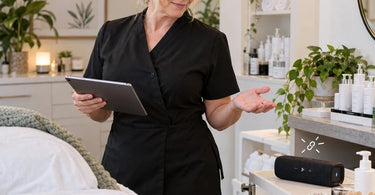
Focus on what matters most... creating a relaxing, professional atmosphere where every client feels comfortable from the moment they walk through the door. Now imagine your client is finally drifting into relaxation during a massage, the soothing music is playing at exactly the right volume, and suddenly... silence. Your Bluetooth speaker has disconnected, leaving you scrambling for your phone while your carefully crafted spa ambiance disappears faster than an appointment slot before a holiday weekend. If your wireless speaker seems to have impeccable timing when it comes to technological tantrums, you are definitely not alone.
Bluetooth speakers have become convenient tools for spas, salons, massage studios, nail salons, and beauty treatment rooms. They eliminate complicated wiring, offer flexible placement, and make it easy to customize background music for different services. Unfortunately, wireless convenience comes with an occasional surprise: the dreaded connection dropout. Understanding why Bluetooth speakers disconnect can help beauty professionals prevent awkward interruptions, troubleshoot problems efficiently, and maintain the peaceful environment clients expect.
Why Do Bluetooth Speakers Disconnect at the Worst Possible Time?
The short answer is that Bluetooth connections depend on several constantly changing conditions, including wireless interference, distance, battery power, connected devices, and software behavior. A speaker does not actually know when your client has reached peak relaxation. It simply reacts to conditions that can interrupt communication between the speaker and its audio source.
Bluetooth transmits information using radio signals in the 2.4 GHz frequency band. Many other wireless devices operate in this same general frequency range, including certain Wi-Fi networks, wireless accessories, and electronic equipment. Bluetooth technology incorporates methods to reduce interference, but it cannot eliminate every possible disruption.
In a busy salon with multiple employees, phones, tablets, wireless equipment, and clients carrying their own devices, the wireless environment can become surprisingly complicated. That relaxing playlist may be competing for radio space with more technology than anyone realizes.
1. Wireless Interference: The Invisible Trouble-Maker
Wireless interference is one of the most common reasons Bluetooth audio skips, stutters, or disconnects. Bluetooth devices share portions of the 2.4 GHz spectrum with other technologies, and crowded wireless environments can affect connection stability.
In professional beauty environments, potential sources of interference include Wi-Fi routers, wireless cameras, nearby Bluetooth accessories, certain lighting systems, and other electronic devices. Even equipment outside the treatment room can influence the wireless environment.
Imagine a busy Saturday afternoon when every styling station is occupied, the reception area is full, and the entire building seems to have brought its own smartphone. Your speaker may work beautifully during quiet morning appointments but start dropping audio during peak business hours.
How to reduce wireless interference:
- Position the speaker away from Wi-Fi routers and clusters of electronic equipment.
- Keep the audio source relatively close to the speaker.
- Avoid placing the speaker directly beside large metal objects or other potential signal barriers.
- Test different speaker locations to find an area with more reliable reception.
- If appropriate for the network, consider using 5 GHz or 6 GHz Wi-Fi for compatible devices to reduce activity on the 2.4 GHz band.
Changing a speaker's location by just a few feet may improve performance. Before replacing the entire sound system, experiment with placement. Sometimes the solution is less expensive than your favorite iced coffee.
2. Your Phone Wandered Too Far Away
Bluetooth range is not unlimited. Although many consumer speakers advertise operating distances around 30 feet or more, actual performance depends on the devices, physical barriers, and surrounding radio environment. Some equipment supports substantially longer distances, while certain indoor layouts reduce usable range.
Consider a massage therapist who pairs a speaker with a smartphone, starts a calming playlist, and then carries that phone into the reception area between services. If the phone moves beyond reliable Bluetooth range, playback may stutter or stop entirely.
Walls, cabinets, metal furniture, and other obstacles can weaken the connection. A signal that travels comfortably across an open room may struggle between treatment areas.
The practical solution: Establish a dedicated location for the device controlling your music. A tablet or phone positioned within the treatment room can provide more predictable performance than an employee's personal phone traveling around the building.
For massage studios, consider placing the audio source on a stable shelf near the massage tables and treatment furniture, while keeping devices and cords away from client walkways and treatment surfaces.
3. Low Battery Power Can Interrupt the Perfect Playlist
Wireless speakers often rely on rechargeable batteries, and some models behave differently as battery levels decrease. Depending on the device, low battery conditions may trigger warning tones, automatic shutdowns, reduced operating time, or interruptions in playback.
The phone or tablet supplying the music can also become part of the problem. Certain battery-saving settings restrict background activity or affect wireless connectivity.
Nothing says luxurious spa experience quite like a speaker loudly announcing that its battery is low during a quiet facial treatment. Fortunately, this particular issue is usually preventable.
Build a charging routine:
- Check speaker battery levels before opening the business.
- Recharge portable speakers according to manufacturer instructions.
- Check the battery level of the connected phone or tablet.
- Review power-saving settings if disconnects consistently occur when battery levels fall.
- Consider an appropriately rated, manufacturer-approved power connection for equipment used throughout the day.
If a speaker repeatedly shuts down despite showing a sufficient charge, the problem may involve a deteriorating battery, charging system, or internal hardware. Consult the manufacturer before continuing to rely on it during appointments.
4. Another Device Is Trying to Steal the Connection
Many Bluetooth speakers remember previously paired devices. Some models automatically reconnect to familiar phones or tablets when those devices come within range. Others support connections to multiple devices, with switching behavior that varies by model.
This becomes particularly entertaining in a salon where several employees have previously connected their phones to the same speaker.
One stylist starts the morning playlist. Another employee arrives with a previously paired phone. Suddenly, the speaker switches sources, pauses playback, or begins playing something entirely unexpected.
Relaxation music turning into someone's enthusiastic workout playlist is certainly memorable, although probably not the client experience you intended.
Prevent unwanted connection changes:
- Assign one primary device to control treatment room audio.
- Remove unnecessary saved pairings from the speaker when supported.
- Disconnect personal phones that do not need access.
- Disable automatic connection features where the equipment allows.
- Train employees to avoid changing audio sources during active treatments.
For businesses with multiple treatment rooms, independently managed speakers and dedicated source devices may provide greater consistency than several employees sharing one speaker connection.
5. Software Updates and Bluetooth Glitches
Sometimes the problem is not the room, the distance, or another device. It is simply software behaving badly.
Bluetooth connections involve communication between the speaker and the operating system of the connected phone, tablet, or computer. Temporary software glitches, outdated Bluetooth drivers, firmware issues, and incompatible settings may contribute to repeated disconnects.
Operating system updates can occasionally change wireless behavior, while manufacturer firmware updates may address known connection problems.
Try these troubleshooting steps:
- Restart the speaker and its connected audio source.
- Turn Bluetooth off and back on at the source device.
- Check for relevant operating system and speaker firmware updates.
- Remove the existing Bluetooth pairing and pair the devices again if simpler fixes fail.
- Follow the speaker manufacturer's instructions for resetting the device when necessary.
For Windows-based audio systems, Bluetooth driver updates and power management settings may also be relevant. Avoid changing advanced settings randomly; follow the device manufacturer's guidance.
Most importantly, perform updates and major troubleshooting outside appointment hours. Nobody wants a software installation progress bar to become part of a luxury massage package.
6. Music Streaming Problems Can Look Like Bluetooth Problems
Here is an important distinction: music stopping does not always mean the Bluetooth connection has disconnected.
When music comes from an online streaming service, playback depends on two separate connections. The device must receive the audio through Wi-Fi or cellular data, and then transmit it to the Bluetooth speaker.
If the internet connection becomes unstable, the speaker may remain perfectly connected while the streaming application buffers or stops playback.
This is especially important for salons and spas operating in buildings with inconsistent Wi-Fi coverage.
How to identify the difference:
- Check whether the source device still shows the speaker as connected.
- Play an audio file stored locally on the device, if available.
- If local audio plays normally while streaming fails, investigate the internet connection or streaming application.
- If both local and streamed audio skip, investigate Bluetooth signal strength, device settings, and speaker performance.
For professional treatment environments, properly licensed music available for offline playback can reduce dependence on continuous internet service. Offline availability does not eliminate Bluetooth interference, but it removes one possible source of disruption.
7. Automatic Sleep Modes and Idle Timers
Some Bluetooth speakers enter standby or shut down automatically after a period of inactivity. These energy-saving features are useful for preserving battery life, but they can be inconvenient during services involving long stretches of silence.
Imagine pausing the music for a consultation, then discovering that the speaker has powered down just as the treatment begins.
Not every speaker automatically reconnects or resumes playback after waking. Some require manual intervention.
Check the speaker's user manual for automatic standby behavior. Certain models allow idle settings to be adjusted, while others have fixed shutdown timers.
When selecting a speaker for a professional treatment room, evaluate its standby behavior alongside sound quality and battery performance. A device designed primarily for occasional recreational use may not offer the operational features a busy spa needs.
How to Fix a Bluetooth Speaker That Keeps Disconnecting
When a connection fails during an appointment, the goal is to restore a comfortable atmosphere without turning the treatment room into an electronics repair workshop.
Use this practical troubleshooting sequence:
- Check the source device. Confirm that the phone or tablet is powered on and still shows the speaker as connected.
- Move the source closer. Temporarily position it within a few feet of the speaker to rule out distance and obstructions.
- Check battery levels. Inspect both the speaker and the connected device.
- Confirm the audio output. Make sure the music application is sending sound to the intended speaker rather than another device.
- Check for competing connections. Disconnect unnecessary phones or tablets if another device may have taken control.
- Test a local audio file. Determine whether the problem involves wireless audio transmission or internet streaming.
- Restart and reconnect. If basic checks fail, restart the devices and establish a fresh connection.
- Test an alternate source. Pair another compatible device to help identify whether the original source or speaker is causing the trouble.
If the speaker disconnects consistently in one location but works elsewhere, the surrounding environment deserves closer investigation. If it disconnects with several source devices in multiple locations, speaker hardware or firmware becomes a more plausible cause.
Why Reliable Background Music Matters in a Spa or Salon
Music influences how clients experience a professional environment. Although no single playlist can guarantee relaxation, appropriate background sound can help create a welcoming atmosphere and support the intended mood of a service.
Different beauty businesses use music in different ways.
Massage studios: Soft, consistent audio can complement comfortable spa bedding, supportive treatment furniture, and carefully selected aromatherapy supplies.
Facial treatment rooms: Gentle background sound can contribute to a soothing environment alongside professional facial treatment products and organized treatment stations.
Nail salons: Background music can help create a pleasant atmosphere around nail salon furniture and workstations without overwhelming client conversations.
Hair salons and barbershops: Consistent music can support the energy of a busy service floor while employees work with professional hair salon and barber supplies.
Waxing and brow studios: Appropriately chosen music can make treatment rooms feel more welcoming while professionals prepare waxing supplies or lash and brow service supplies.
Music should remain at a comfortable volume, allowing employees to communicate clearly with clients. Preferences vary, and some clients may prefer very quiet surroundings or no music at all.
In any case, an unexpected audio interruption can distract from the experience. Preventing repeated disruptions is one small but meaningful part of maintaining a professional atmosphere.
Should Spas Use Bluetooth Speakers or Wired Sound Systems?
Bluetooth speakers are convenient, but they are not automatically the best choice for every business. The appropriate system depends on room layout, available infrastructure, staffing, and the importance of uninterrupted audio.
Bluetooth speakers work well when:
- Individual treatment rooms need independent music control.
- The source device can remain close to the speaker.
- Portable equipment is useful for flexible room arrangements.
- Installing permanent wiring is impractical.
- Employees can manage charging and pairing consistently.
Wired audio connections may be preferable when:
- Continuous playback is essential throughout long appointments.
- Wireless interference remains a recurring problem.
- The speaker and source device remain in fixed positions.
- The business wants to minimize Bluetooth pairing and reconnection issues.
A wired audio connection removes the Bluetooth radio link, although the system still depends on the reliability of its power supply, source device, and music service. Wi-Fi-based or professionally installed multiroom systems may also be appropriate for larger businesses, but those systems introduce their own network and maintenance considerations.
For smaller studios, a quality Bluetooth speaker with a stable connection and a documented backup procedure may provide everything needed.
How to Choose a Bluetooth Speaker for Professional Spa Use
Shopping for professional audio equipment requires more than checking whether a speaker looks attractive on a shelf.
Consider the following practical features before making a purchase.
Reliable connectivity: Review the manufacturer's stated compatibility, connection behavior, and supported audio inputs. Newer Bluetooth versions may offer useful improvements, but version numbers alone do not guarantee a stable connection.
Appropriate battery capacity: Select a model that can comfortably support expected daily use, with additional time available between charging sessions.
Wired input options: A speaker equipped with an auxiliary audio input can provide an alternative connection method, provided compatible cables and source devices are available.
Easy controls: Straightforward volume, playback, and pairing controls reduce the chances of employees accidentally changing settings.
Suitable sound quality: Clear audio at moderate volumes is generally more useful for relaxation treatments than exaggerated bass or maximum loudness.
Manageable alerts: Investigate whether the speaker produces loud pairing announcements, charging notifications, or automatic shutdown tones. The last thing a peaceful massage needs is a cheerful electronic voice announcing a new connection.
Convenient cleaning: Select equipment that can be positioned away from product spills, moisture, and treatment materials. Follow manufacturer instructions for cleaning electronic surfaces, particularly in environments using massage oils, lotions, or other professional products.
For businesses looking to coordinate treatment-room equipment and supplies, spa essentials for professionals can complement a thoughtfully arranged workspace.
Create a Five-Minute Music Check Before Opening
The easiest Bluetooth problem to solve is the one that never interrupts an appointment. A brief opening routine can catch many preventable issues before clients arrive.
Consider adding this checklist to your daily setup:
- Turn on each speaker and verify its battery or power connection.
- Confirm that the correct phone or tablet is paired.
- Play music for several minutes to check for interruptions.
- Walk through the normal working area with the source device, if it will be moved during service.
- Check the streaming connection or availability of approved offline music.
- Confirm that volume levels are suitable for the room.
- Keep a backup audio solution accessible.
- Remind employees which device controls each speaker.
For larger businesses, assigning responsibility for music setup prevents the familiar mystery of everyone assuming someone else charged the speaker.
This kind of preventive routine fits naturally alongside checking treatment beds, organizing clean professional towels, preparing products, and inspecting other salon and spa business essentials.
What Should You Do If the Music Stops During a Client Treatment?
Even excellent preparation cannot prevent every technical problem. When music stops unexpectedly, the professional response matters more than the glitch itself.
First, avoid making the interruption the center of attention. If the client appears comfortable, briefly check whether the silence is actually a problem. Some clients enjoy quiet treatments.
If music is desired, restore playback using the simplest available method. Avoid repeatedly opening apps, announcing technical frustrations, or interrupting a treatment to conduct lengthy troubleshooting.
If reconnection takes more than a brief moment, use your prepared backup or continue without music until an appropriate break.
And if the speaker insists on announcing its connection status at full volume, that is an excellent reminder to investigate notification settings after the appointment, not during it.
Frequently Asked Questions About Bluetooth Speaker Disconnects
Why does my Bluetooth speaker disconnect even when my phone is nearby?
Distance is only one factor. Wireless interference, low battery power, another paired device, software glitches, and speaker hardware problems can cause interruptions even at close range. Test the devices in a different location to narrow down the cause.
Can salon equipment interfere with Bluetooth speakers?
Some electronic equipment may contribute to wireless interference, depending on its design and operating characteristics. Nearby routers, wireless devices, certain lighting equipment, and other electronics can also affect reception. Do not assume a particular salon machine is responsible without testing.
Why does my Bluetooth speaker disconnect when someone calls my phone?
Calls and notifications can temporarily interrupt media playback or change audio routing. The behavior depends on the phone, application, and connected speaker. Using a dedicated music device and appropriately configured notification settings can help prevent interruptions. Ensure emergency communications remain accessible.
Does Bluetooth work without Wi-Fi?
Yes. Bluetooth audio transmission does not require Wi-Fi. However, streaming music from an internet-based service may require Wi-Fi or cellular data unless the audio is available offline.
Will buying a newer Bluetooth speaker fix constant disconnections?
Not necessarily. A newer model may improve compatibility or connection performance, but environmental interference, excessive distance, and source-device problems can affect new speakers too. Identify the likely cause before investing in replacement equipment.
Can multiple Bluetooth speakers play the same music?
Some devices support synchronized playback through manufacturer-specific grouping features or compatible broadcast technologies. Standard Bluetooth pairing does not automatically guarantee that several unrelated speakers can play together. Check compatibility before purchasing speakers for multiple treatment rooms.
Is Bluetooth or wired audio better for massage rooms?
Both can work well. Bluetooth offers convenience and flexible placement, while wired audio avoids Bluetooth radio interference. For rooms where uninterrupted sound is especially important, a wired connection or reliable backup option may be worth considering.
Keep the Relaxation Going, Even When Technology Has Other Plans
Bluetooth speakers have made professional background music easier to manage, but wireless convenience is not the same as perfect reliability. Connection interruptions typically have identifiable causes, including interference, distance, battery issues, competing devices, and software problems.
For spas, salons, massage studios, and beauty professionals, the most effective approach is preventive maintenance combined with a simple troubleshooting plan. Keep source devices close, manage paired connections, charge equipment consistently, and test audio before appointments begin.
The result is a more dependable treatment environment where music supports the experience instead of unexpectedly becoming the main event.
At Pure Spa Direct, we understand that a polished client experience depends on more than the treatment itself. As a professional beauty and wellness supply distributor, we help businesses source the spa and salon equipment and furniture, treatment supplies, and everyday essentials that support comfortable, organized service environments.
Because the only thing that should be dropping during a relaxing spa appointment is your client's stress level, not the Bluetooth connection.
